Loading

iPhone Targeted Content

ACADEMIA PREMIUM ONLINE EDUCATION
THE HELP CENTER
ANSWERS TO COMMON QUESTIONS
iPad Targeted Content
Android Targeted Content
ACADEMIA PREMIUM ONLINE EDUCATION
THE HELP CENTER
ANSWERS TO COMMON QUESTIONS
Blackberry Targeted Content
Desktop and all none targeted content

ACADEMIA PREMIUM ONLINE EDUCATION
THE HELP CENTER
ANSWERS TO COMMON QUESTIONS
Do you have some questions about CDI's educational programs?
You're in the right place. CDI is a world leader in chiropractic education. A good question to ask yourself when evaluating any educational activity is this, 'Will this just give me a pile of information on the topic, or will it actually help me think more effectively and make a better diagnosis?' That is why all of our online learning programs are case-based exercises in diagnostic thinking, and not just information-based slideshows on the web. We invite you to continuously learn with us and enjoy the increased confidence of being a master diagnostician.
<- Just click on one of the links to the left.
Is the same content available online as in the live seminars?
Not exactly.
The online programs are not online versions of the live CTCP Modules. But there is similar content and quite a bit of overlap as you might imagine. Of course, the online materials have the advantage of convenience and cost-effectiveness, and you can review them as often as you like.
We have only recently begun to record our live seminars and make them available online. More will be available soon.
The online programs are not online versions of the live CTCP Modules. But there is similar content and quite a bit of overlap as you might imagine. Of course, the online materials have the advantage of convenience and cost-effectiveness, and you can review them as often as you like.
We have only recently begun to record our live seminars and make them available online. More will be available soon.
Do I need to be a member if I only want to attend a live seminar?
Yes. If you wish to register for one of our live events then you still need to be a member of the site (this is free). It is easy to create your member profile, which will then be used to communicate with you via email. We will also use this to send you a link to download the course notes for the seminar and to provide you with your Certificate of Attendance. You can sign up now in about a minute here:
https://cdi.edu.au/socius/member_signup.php
https://cdi.edu.au/socius/member_signup.php
What is the difference between free membership and premium?
CDI offers you two levels of membership: free (known as SOCIUS) and premium (called ACADEMIA).
1. Free SOCIUS membership has lots to offer. You can watch interviews with specialists from other disciplines and earn informal CPD points along the way. There are also clinical articles that you can read to gain further CPD, or watch our Grand Rounds. We also offer our free MyCPD Portfolio feature, which allows you to store all of your continuing education records in one place - no matter where you did them.
2. Our ACADEMIA membership is available on a credits system, which you can then use to buy premium content on the site. Credits are available in blocks of:
You can then use these to access whichever activities you wish, with each costing either 2 or 3 credits - depending upon the number of continuing education hours allocated to it.
You can find out more here.
1. Free SOCIUS membership has lots to offer. You can watch interviews with specialists from other disciplines and earn informal CPD points along the way. There are also clinical articles that you can read to gain further CPD, or watch our Grand Rounds. We also offer our free MyCPD Portfolio feature, which allows you to store all of your continuing education records in one place - no matter where you did them.
2. Our ACADEMIA membership is available on a credits system, which you can then use to buy premium content on the site. Credits are available in blocks of:
- 10 credit hours for AUD $240 (+GST)
- 50 credit hours for AUD $1000 (+GST)
- Choose 1 - 5 credit hours for AUD $29 (+GST) each
You can then use these to access whichever activities you wish, with each costing either 2 or 3 credits - depending upon the number of continuing education hours allocated to it.
You can find out more here.
Do I need to be a member if I only want to attend a live seminar?
Yes. If you wish to register for one of our live events then you still need to be a member of the site (this is free). It is easy to create your member profile, which will then be used to communicate with you via email. We will also use this to send you a link to download the course notes for the seminar and to provide you with your Certificate of Attendance. You can sign up now in about a minute here:
https://cdi.edu.au/socius/member_signup.php
https://cdi.edu.au/socius/member_signup.php
How do I purchase premium (ACADEMIA) credits?
Firstly, you have to be a member of the website (a free member is fine).
Log in as normal and you will then be taken to the 'My Dashboard' page. Here you will see a summary of your profile information that looks like this:

Click on the three small circles underneath your details to bring up a menu like the one below. Then simply click on the 'Purchase credits' button to buy your credits securely via PayPal.

Once you have done this your account will be credited with the number of hours you selected and you can choose whichever activities you want. You can top up your credits here at any time.
Log in as normal and you will then be taken to the 'My Dashboard' page. Here you will see a summary of your profile information that looks like this:
Click on the three small circles underneath your details to bring up a menu like the one below. Then simply click on the 'Purchase credits' button to buy your credits securely via PayPal.
Once you have done this your account will be credited with the number of hours you selected and you can choose whichever activities you want. You can top up your credits here at any time.
Do my credits expire if I don't use them?
No. Your credits don't expire and you can use them whenever you wish.
What happens when I run out of credits? Can I access my previously purchased content?
If you run out of credits it is easy to buy some more at any time. However, you can always access previously purchased content - even if you have a zero credit balance. This allows you to build a reference library over time.
How many credits do I have to buy at once?
Credits are available in blocks of:
• 10 credit hours for AUD $240 (+GST)
• 50 credit hours for AUD $1000 (+GST)
• Choose 1 - 5 credit hours for AUD $29 (+GST) each
• 10 credit hours for AUD $240 (+GST)
• 50 credit hours for AUD $1000 (+GST)
• Choose 1 - 5 credit hours for AUD $29 (+GST) each
How many credits do I need for each activity?
You can access formal learning activities on the site by using your credits - according to the following formula:
1. eLearning Episodes (3 hrs) = 3 credits
2. Diagnostic Drills (2 hrs) = 2 credits
3. Communication Drills (2 hrs) = 2 credits
4. Clinical Masterclasses (3 hrs) = 3 credits
1. eLearning Episodes (3 hrs) = 3 credits
2. Diagnostic Drills (2 hrs) = 2 credits
3. Communication Drills (2 hrs) = 2 credits
4. Clinical Masterclasses (3 hrs) = 3 credits
Can I preview an activity before deciding to purchase it?
Yes you can.
Both the Diagnostic Drills and the Communication Drills allow you to sample the first page of the activity and read the basic scenario before committing to purchase. Just click on the 'Preview Activity' button as shown below.

If you decide to continue past the first page of the Drill you will then spend 2 credits to do so (don't worry, you will receive a warning before proceeding).
The eLearning Episodes are a little different. You can preview the introduction to the video right on the Episode home page. Just click on the preview icon as shown in the image below.

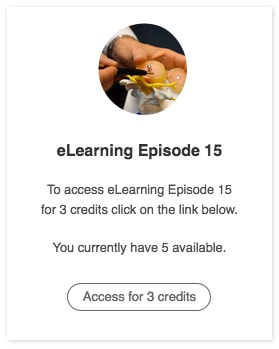
If you decide to purchase the Episode then click on the 'Start this activity' button. You will be shown a confirmation message before you proceed, just like the one below.
Both the Diagnostic Drills and the Communication Drills allow you to sample the first page of the activity and read the basic scenario before committing to purchase. Just click on the 'Preview Activity' button as shown below.
If you decide to continue past the first page of the Drill you will then spend 2 credits to do so (don't worry, you will receive a warning before proceeding).
The eLearning Episodes are a little different. You can preview the introduction to the video right on the Episode home page. Just click on the preview icon as shown in the image below.
If you decide to purchase the Episode then click on the 'Start this activity' button. You will be shown a confirmation message before you proceed, just like the one below.
What happens when I run out of credits? Can I access my previously purchased content?
If you run out of credits it is easy to buy some more at any time. However, you can always access previously purchased content - even if you have a zero credit balance. This allows you to build a reference library over time.
Can I access my purchased content at any time?
Yes, you can review your activities and watch the videos whenever you like.
How is formal CPD assessed on the site? Do I have to do an exam?
As a premium ACADEMIA member you can earn formal CPD points by reviewing specific learning activities and then sitting an online quiz. These activities include our eLearning Episodes, Diagnostic Drills, Communication Drills and our Clinical Masterclasses.
The quiz is presented in a multiple choice format, with questions related to the activity you have just completed. You must score 100% to earn your CPD points. If you do not score 100% on your initial attempt you will be told which questions were answered incorrectly and given a second try.
If you fail to answer all questions correctly on two successive occasions, you must wait 24 hours until your next attempt. This time should be used to review the original learning material. Following this, you are allowed another attempt every 24 hours until you have passed the Quiz.
Your first attempt at the Quiz is very important, as this is the score that is recorded in your Portfolio and used to calculate your Grade Point Average (GPA). This score is used for quality assurance and also for recognition of excellence. Importantly, if you wish to sit the IANM examination you must maintain a minimum GPA of 0.8 (80%) across all of the online education hours. If your GPA is lower than 80% then you will need to undertake further training based upon a review by CDI.
The quiz is presented in a multiple choice format, with questions related to the activity you have just completed. You must score 100% to earn your CPD points. If you do not score 100% on your initial attempt you will be told which questions were answered incorrectly and given a second try.
If you fail to answer all questions correctly on two successive occasions, you must wait 24 hours until your next attempt. This time should be used to review the original learning material. Following this, you are allowed another attempt every 24 hours until you have passed the Quiz.
Your first attempt at the Quiz is very important, as this is the score that is recorded in your Portfolio and used to calculate your Grade Point Average (GPA). This score is used for quality assurance and also for recognition of excellence. Importantly, if you wish to sit the IANM examination you must maintain a minimum GPA of 0.8 (80%) across all of the online education hours. If your GPA is lower than 80% then you will need to undertake further training based upon a review by CDI.
Why is there a timer on each activity page?
To qualify for accreditation our activities must use a timing mechanism to ensure that you spend the required amount of time learning. Although the activity timer at the bottom of the screen may run for a longer timeframe than the actual video, this reflects the anticipated time necessary to pause the videos and write notes as you go.
Please note that the timer will only be required on your first run through.
Important: Once the timer has reached zero, a button will appear in its place that looks like the one below.
Please note that the timer will only be required on your first run through.
Important: Once the timer has reached zero, a button will appear in its place that looks like the one below.

It is important that you click on this button to 'log' the page (and the timer) as completed. If you want to leave the activity and come back later, the timer will start again unless you have clicked on this button.
What is a 'reflection' and why do I have to write one?
All of the learning activities on the site require you to write a 'reflection'.
A reflection is simply a paragraph or two that describe the new insights, knowledge or expertise that you have gained from this learning exercise. When you have completed your reflection a copy of it will be emailed to you, and it will also be stored in your MyCPD Portfolio.
Please note that in the case of a registration board audit you will be required to produce a copy of your reflections for each and every learning activity that you have undertaken.
A reflection is simply a paragraph or two that describe the new insights, knowledge or expertise that you have gained from this learning exercise. When you have completed your reflection a copy of it will be emailed to you, and it will also be stored in your MyCPD Portfolio.
Please note that in the case of a registration board audit you will be required to produce a copy of your reflections for each and every learning activity that you have undertaken.
When do I get my certificate?
As soon as you have successfully completed the online quiz you will receive your Certificate of Completion via email.
Can I earn informal CPD points on the site for free?
Absolutely. When you spend time inside the CDI Members Area you can gain valuable CPD points - whether you are a free or premium member. Our free SOCIUS activities, such as interviews or Forum participation, have a special "Log CPD Now" button on the page. Just click on this to record your activity.
You can also log other non-CDI activities that you have done elsewhere, such as seminars or journal reading. Then review your MyCPD portfolio at any time and print on-demand. Just go to the link below to start entering your information.
https://cdi.edu.au/socius/portfolio.php
You can also log other non-CDI activities that you have done elsewhere, such as seminars or journal reading. Then review your MyCPD portfolio at any time and print on-demand. Just go to the link below to start entering your information.
https://cdi.edu.au/socius/portfolio.php
What is MyCPD Portfolio?
Your MyCPD Portfolio is a free service for all members.
Premium members will automatically record their completed ACADEMIA activities in their Portfolio (as soon as you pass the quiz). Free SOCIUS members can record their informal CPD activities by looking for the "Log CPD Now" button found on many of the pages of this site. You can also log other non-CDI pursuits directly from the MyCPD page and keep all of your CPD records in one place. Your Portfolio is ready to print at any time. You can access your records here:
https://cdi.edu.au/socius/portfolio.php
Think of your MyCPD Portfolio as your permanent CPD record.
Premium members will automatically record their completed ACADEMIA activities in their Portfolio (as soon as you pass the quiz). Free SOCIUS members can record their informal CPD activities by looking for the "Log CPD Now" button found on many of the pages of this site. You can also log other non-CDI pursuits directly from the MyCPD page and keep all of your CPD records in one place. Your Portfolio is ready to print at any time. You can access your records here:
https://cdi.edu.au/socius/portfolio.php
Think of your MyCPD Portfolio as your permanent CPD record.
I lost my certificate. How do I get another one?
You can obtain a replacement certificate at any time. Just go to the Certificates page and you will see every activity that you have completed listed in date order.

Look for the learning activity that you need and you will see an icon in the bottom left hand corner, as shown in the image above. Click on this and you will receive another copy of your certificate immediately via email.
Look for the learning activity that you need and you will see an icon in the bottom left hand corner, as shown in the image above. Click on this and you will receive another copy of your certificate immediately via email.
What happens if I get audited?
If you get audited by your registration board you will need to prove that you have undertaken sufficient CPD for your state requirements. To do this you will have to produce copies of each PDF certificate that you have earned on the site, as well as any reflections that you have written as part of a learning assessment. These reflections were emailed to you at the time of the activity.
Please note that while CDI does store a copy of these reflections for you now, this is only a relatively recent development. As such, you should obtain your past reflections from your email records.
You should also print out a copy of your MyCPD Portfolio:
https://cdi.edu.au/socius/portfolio.php
Please note that while CDI does store a copy of these reflections for you now, this is only a relatively recent development. As such, you should obtain your past reflections from your email records.
You should also print out a copy of your MyCPD Portfolio:
https://cdi.edu.au/socius/portfolio.php
I have messed up one of my Portfolio entries - how can I edit it?
If you make a mistake entering a CPD activity in your Portfolio you can easily edit it. To do so, just click on the small 'pencil' icon that sits at the bottom of each entry. This will bring up a separate editing window that will allow you to make whatever changes you wish.

Please note that you cannot delete an entry entirely from your Portfolio.
However, if you email us with a quick description of what you'd like changed we will update it for you within a few hours. Just contact us at:
helpdesk@cdi.edu.au
However, if you email us with a quick description of what you'd like changed we will update it for you within a few hours. Just contact us at:
helpdesk@cdi.edu.au
How do I qualify to sit the IANM Diplomate exam?
Once you have completed 300 hours of approved clinical training you may be eligible to sit for the DIANM exam, which is administered by the International Academy of Neuromusculoskeletal Medicine.
The IANM has recently updated its policy on online training so that the entire 300 hours may now be undertaken online.
The IANM has recently updated its policy on online training so that the entire 300 hours may now be undertaken online.
What is the process for registering for the exam?
To secure your examination seat you must notify the Academy Executive Director at least 90 days before the date you wish to undertake the test.
You can contact the Academy Executive Director here:
You will then be sent information stipulating the requirements for the exam, and forms to assist you in obtaining the required documentation. Following this, you can choose register on the IANM website for the online Part I Examination.
You can contact the Academy Executive Director here:
You will then be sent information stipulating the requirements for the exam, and forms to assist you in obtaining the required documentation. Following this, you can choose register on the IANM website for the online Part I Examination.
When can I take the examinations?
Beginning on July 15th 2026, the IANM is launching its all new Examination Platform. After completing the application and registration process on the IANM website, candidates wishing to sit for the Part I and Part II IANM Board certification examinations may do so at any time, day or night.
This new Examination Platform means that the IANM has achieved the next level of accreditation in examination delivery, grading, item analysis, and candidate communication. In addition to the traditional Part I and Part II board certification exams, the IANM will soon be adding a variety of sub-specialty exams for members, certificate holder candidates, fellowship candidates, and voluntary MOC exams for all members who desire them.
The fee schedule and availability of each will soon be posted on the IANM website with hot links for registration.
Any questions should be directed to Dr Bruce Van Gundersen, DC FIANM, Executive Director, IANM.
This new Examination Platform means that the IANM has achieved the next level of accreditation in examination delivery, grading, item analysis, and candidate communication. In addition to the traditional Part I and Part II board certification exams, the IANM will soon be adding a variety of sub-specialty exams for members, certificate holder candidates, fellowship candidates, and voluntary MOC exams for all members who desire them.
The fee schedule and availability of each will soon be posted on the IANM website with hot links for registration.
Any questions should be directed to Dr Bruce Van Gundersen, DC FIANM, Executive Director, IANM.
What is the format of the Part 1 examination?
The IANM examinations are held in two parts.
The Part I Examination is an online multiple-choice exam that can be undertaken at home or in the office using your own computer. To do this, the IANM uses an online proctoring service called ProctorFree.
There is a non-refundable application fee of $150 USD to start the application process. The examination fee for Part I is $1350 USD, plus any proctor fees.
The Part I Examination is an online multiple-choice exam that can be undertaken at home or in the office using your own computer. To do this, the IANM uses an online proctoring service called ProctorFree.
There is a non-refundable application fee of $150 USD to start the application process. The examination fee for Part I is $1350 USD, plus any proctor fees.
How is the Part 2 examination different?
Once you have successfully completed the Part I exam you are qualified to sit the Part II Objective Structured Clinical Examination (OSCE). This is a timed examination consisting of three OSCE modules in a four hour period.
The Part II fee is $1350 USD, plus any proctoring fees. Again, the IANM uses the online ProctorFree service to allow you to sit the exam in your home or office.
The Part II fee is $1350 USD, plus any proctoring fees. Again, the IANM uses the online ProctorFree service to allow you to sit the exam in your home or office.
How does the home proctoring work?
The IANM uses a hybrid system to proctor exams, with both AI proctoring software (ProctorFree) and human review to ensure the academic integrity of all students while also avoiding false negatives.
The ProctorFree software uses AI to flag 'possible' breaches of academic integrity. Then, the examination team reviews any potential problem flagged by the software to make a determination.
The ProctorFree software uses AI to flag 'possible' breaches of academic integrity. Then, the examination team reviews any potential problem flagged by the software to make a determination.
What computer do I need to access content?
Firstly, you need either a Macintosh (minimum OS 10.9) or a Windows computer (minimum Windows 7) capable of connecting to the internet. The speed of your broadband connection is important, as it dictates the speed of video download. You should have at least 3 Mbps bandwidth for adequate performance and you can test your own connection speed using the following free service:
https://www.speedtest.net/
Your operating system needs to be able to run a modern browser, such as Safari, Chrome or Firefox - which all conform to modern web standards and perform well. Internet Explorer 10 and 11 also work well, but older versions of IE (particularly IE 8) are not very good with all video formats. You can download the latest version of your favourite browser at the link below:
https://outdatedbrowser.com/en
https://www.speedtest.net/
Your operating system needs to be able to run a modern browser, such as Safari, Chrome or Firefox - which all conform to modern web standards and perform well. Internet Explorer 10 and 11 also work well, but older versions of IE (particularly IE 8) are not very good with all video formats. You can download the latest version of your favourite browser at the link below:
https://outdatedbrowser.com/en
Can I access the website on a mobile device?
Yes you can. All of our content works perfectly well on tablets and mobile phones. However, we are currently upgrading the site to make it responsive to the device you are using - so that it adapts the content to give you the best viewing experience. This upgrade is time consuming and ongoing, so not all activities are currently optimised for mobile viewing. Please be patient.
Why are the videos playing so slowly?
1. Slow videos are very frustrating and it usually comes down to a number of variables. The most obvious is your own connection speed. You can test your connection speed using the following free service:
https://www.speedtest.net/
Our videos will play perfectly well with only modest download speeds - from as little as 3 Mbps. If you are not able to view them properly with a bandwidth greater than this, then your problem lies somewhere else.
2. Browser choice. Modern browsers such as Safari, Chrome and Firefox conform to all modern web standards and perform well. Internet Explorer 10 and 11 also work well, but older versions of IE (particularly IE 8) are not very good with all video formats. You can download the latest version of your favourite browser at the link below:
https://outdatedbrowser.com/en
3. If the videos are playing slowly on your computer then you can alter the playback quality to better suit your download bandwidth. To do this, just click on the gear icon in the bottom right corner of the video player and a menu will appear, as shown below.
https://www.speedtest.net/
Our videos will play perfectly well with only modest download speeds - from as little as 3 Mbps. If you are not able to view them properly with a bandwidth greater than this, then your problem lies somewhere else.
2. Browser choice. Modern browsers such as Safari, Chrome and Firefox conform to all modern web standards and perform well. Internet Explorer 10 and 11 also work well, but older versions of IE (particularly IE 8) are not very good with all video formats. You can download the latest version of your favourite browser at the link below:
https://outdatedbrowser.com/en
3. If the videos are playing slowly on your computer then you can alter the playback quality to better suit your download bandwidth. To do this, just click on the gear icon in the bottom right corner of the video player and a menu will appear, as shown below.

Then alter the playback quality to a lower number (e.g. from 1080p down to 720p).
4. In many cases rebooting your router will help. This is a common fix. Note that you need to power it down completely and unplug from a power source for 20 seconds, not just push a reset switch.
5. If your router is greater than 3 years old there may be a compatibility issue with some of the newer video streaming protocols. A symptom of this would be variable video performance on different websites. If you find that our videos are slow, but other sites are OK, then it may well be the age of your router - as our videos are using the newest technology. The benefit of newer protocols is that they perform well, even on slow connections. However, some older routers have trouble with this technology and tend to stutter. If this is the case, then it might be time for a new (and more secure) router.
4. In many cases rebooting your router will help. This is a common fix. Note that you need to power it down completely and unplug from a power source for 20 seconds, not just push a reset switch.
5. If your router is greater than 3 years old there may be a compatibility issue with some of the newer video streaming protocols. A symptom of this would be variable video performance on different websites. If you find that our videos are slow, but other sites are OK, then it may well be the age of your router - as our videos are using the newest technology. The benefit of newer protocols is that they perform well, even on slow connections. However, some older routers have trouble with this technology and tend to stutter. If this is the case, then it might be time for a new (and more secure) router.
I've tried everything you've said and I'm still having troubles. What now?
If you have tried everything listed above then you should contact us for assistance. Please be specific in your email - simply saying that 'The videos aren't working' doesn't help us. You will need to include the following information:
1. Have you ever been able to watch any of the videos, or was this the first time you've tried and they just don't work?
2. What operating system are you using?
3. What browser (and version) are you using?
4. Are you getting an error message? If so, what does it say?
5. Please describe the behaviour of the problem.
Send your email to:
helpdesk@cdi.edu.au
1. Have you ever been able to watch any of the videos, or was this the first time you've tried and they just don't work?
2. What operating system are you using?
3. What browser (and version) are you using?
4. Are you getting an error message? If so, what does it say?
5. Please describe the behaviour of the problem.
Send your email to:
helpdesk@cdi.edu.au
Have a question? We can help.
The most common questions are answered right here on this page.
1. For general enquiries please contact us at: cdi@cdi.edu.au
2. For technical support, or questions about your CPD portfolio, please contact us at: helpdesk@cdi.edu.au
2. For technical support, or questions about your CPD portfolio, please contact us at: helpdesk@cdi.edu.au